


|
|
|
|
|
|
Model Development | Model Description | Why is XDL The Best AHDL Language For You?
Overview
| What Can You
Do With XDL? | What's
Included in the CMSDK? | More
Information
|
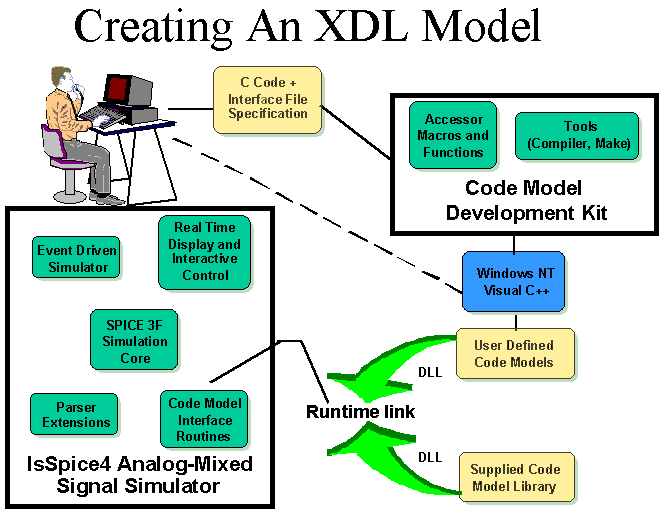
The Intusoft CMSDK
provides a major breakthrough in HDL model development. It provides
an easy way to add tremendous functionality to SPICE without having
to deal with SPICE's intricacies. The CMSDK assists you in writing,
compiling, and using C code subroutines (XDL code models) with
IsSpice4. The kit works with additions to the IsSpice4 simulator
core that tell the simulator how to parse the XDL model syntax
and call C code that defines the model's behavior (Figure above).
A new code model is created from two user generated files. First,
the CMSDK uses a C language compiler to convert an easy to read
text file into the C data structures required
by the simulator. This "interface file"
(.IFS file) is an ASCII table that describes the model's ports
and parameters. The model's behavior is described in another file
using standard C syntax. These two portable files make up the
XDL model's description. Special C macros and functions greatly
simplify the details of interfacing the model to IsSpice4. The
complexities of SPICE are hidden; the CMSDK does most of the
work for you. The result of a successful build is a code model
library (Windows DLL) that can be accessed by the IsSpice4 simulator.
There is no need to recompile the IsSpice4 executable each time
a new model is added. The result is an incredibly simple development
path that greatly reduces the effort in making new models
and eliminates the need for you to learn about the internal workings
of SPICE.
The use of a Windows DLL is unique to the Intusoft implementation
of XDL. The C code describing the model's behavior is linked to
the simulator via this external file rather than being bound within
the executable program. This allows new models to be easily added
and existing models to be modified without affecting the simulator.
Although code models must be developed under Windows NT or Windows
9x, the resulting DLL can be used with IsSpice4 running under
Windows 3.1x, 9x or NT on any compatible platform (x86, Unix,
or Alpha). An expanding variety of over 42 analog, digital, and
mixed analog/digital XDL models are currently shipped with the
IsSpice4 simulator including a State Machine, MIDI controlled
oscillator, s-domain (Laplace) transfer function, magnetic core,
sampled data filter elements and array/file
processing models. Intusoft is currently developing more models
but expects users will share the DLLs and XDL model source code
they develop.
XDL Model Description
XDL models consist of an ASCII text “.IFS” file (interface file specification) and a C code file (below) describing the model’s behavior. The IFS file describes the model’s ports and parameters. The IFS file is compiled into C code using a special compiler supplied with the CMSDK.
ASCII Model Description File
Interface File SpecificationNAME_TABLE: C_Function_Name: cm_gain Spice_Model_Name: gain Description: “A simple gain block” PORT_TABLE: Port_Name: in out Description: “input” “output” Direction: in out Default_Type: v v Allowed_Types: [v,vd,i,id,vnam] [v,vd,i,id] Vector: no no Vector_Bounds: - - Null_Allowed: no no PARAMETER_TABLE: Parameter_Name: in_offset gain out_offset Description: “input offset” “gain” “output offset” Data_Type: real real real Default_Value: 0.0 1.0 0.0 Limits: - - - Vector: no no no Vector_Bounds: - - - Null_Allowed: yes yes yes
An example C code listing for a GAIN block. The “C code” uses XDL Macros, Functions, and C code to describes the model’s behavior. An extensive list of macros and functions are provided that remove the need for you to "get into" the internals of SPICE. See the CMSDK documentation for more details.
XDL Model Body
- void cm_gain(ARGS) /* structure holding parms, inputs, outputs, etc. */
{
- Mif_Complex_t ac_gain;
- if(ANALYSIS != AC) {
- OUTPUT(out) = PARAM(out_offset) + PARAM(gain) *
- ( INPUT(in) + PARAM(in_offset));
- PARTIAL(out,in) = PARAM(gain);
- }
else {
- ac_gain.real = PARAM(gain);
ac_gain.imag = 0.0;
AC_GAIN(out,in) = ac_gain;
- }
}
Code Model Netlist Format
Format: Aname N1 [N2 N3 ....] (Nx Nx+1) Vsource Name
Example: A1 [1 2 3 4] 5 NAND4
.Model Nand4 D_Nand(Rise_delay=10N)
Code Models begin with the letter A. Model ports can be defined by a single node, a vector of nodes, a voltage source name or a differential (voltage or current) port. Some ports can be left unconnected and some ports are allowed to use one or more port types. Node types may be current or voltage (traditional SPICE types) as well as digital, real, integer, array, or user-defined.
For example a Gain block can be described as:
A1 1 2 Gain ; <-- 2 single ended voltage node ports or
A1 %vd(1 2) 3 Gain ; <-- 1 differential input and 1 single ended output
All code models must have a .model statement. Unlike in SPICE, model parameter values can be real, integer, Boolean, string (file name), or complex. You can even has a single model parameter be a series of values.
Using an AHDL Model
Code models are called like any
other device that uses a model. First there is a call line beginning
with the letter A, the node designations, and then the model name.
A1 1 0 Gblock
.Model Gblock Gain (gain=10 in_offset=10m)
(C) 1996-1999, copyright Intusoft; All Rights Reserved.